The average knowledge worker spends 30% of their time on repetitive tasks that could be automated. That is 12+ hours per week spent on work a computer could do in seconds.
This guide shows you how to identify and automate those tasks, even if you have never written a line of code.
What Can Be Automated?
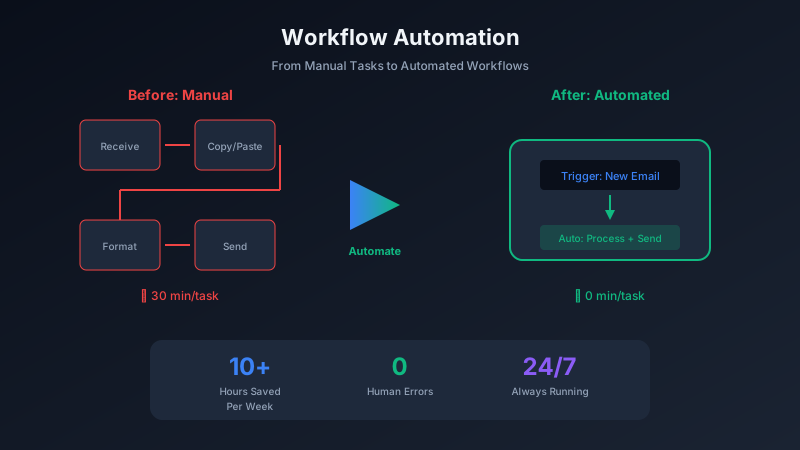
Look for tasks that:
- Follow the same steps every time
- Involve moving data between applications
- Happen on a regular schedule
- Require no creative judgment
Common Automation Candidates
- Data entry between systems
- Email responses to common questions
- File organization and backups
- Social media posting
- Report generation
- Meeting scheduling and reminders
The Tools
Zapier
Zapier connects 5,000+ apps with no coding required. Create "Zaps" that trigger actions when events happen. Free tier includes 100 tasks per month.
Make (formerly Integromat)
More powerful than Zapier with visual workflow building. Better for complex automations with multiple steps and conditional logic.
Apple Shortcuts / Microsoft Power Automate
Built into your operating system. Great for automating tasks on your own device without third-party services.
Your First Automation
Start simple. Here is an example anyone can implement:
Automation: When you receive an email with an attachment, automatically save the attachment to a specific folder.
- Connect your email to Zapier
- Set trigger: "New email with attachment"
- Set action: "Save file to Google Drive/Dropbox"
- Test and activate
This simple automation can save hours of manual file management over time.
Building More Complex Workflows
Once you understand the basics, you can chain actions together:
Example: New customer inquiry workflow
- Trigger: Form submission on website
- Action 1: Create contact in CRM
- Action 2: Send welcome email
- Action 3: Create task in project management tool
- Action 4: Notify team member via Slack
What once required 10 minutes of manual work now happens instantly.
Measuring Results
Track your automation impact:
Common Mistakes to Avoid
- Over-automating: Not everything should be automated. Focus on high-frequency, low-complexity tasks first.
- Ignoring edge cases: Test your automations with unusual inputs before relying on them.
- No monitoring: Check your automations periodically to ensure they are still working correctly.
The Pixel Pantry Perspective
At Pixel Pantry, we build tools that work well with automation platforms. Our applications are designed with clean inputs and outputs, making them easy to integrate into your workflows.
Automation is not about replacing human work - it is about freeing humans to do work that matters. The repetitive stuff? Let the machines handle it.