Professional invoicing software typically costs $15-50 per month. But for most small businesses and freelancers, free tools provide everything you need to bill clients professionally and get paid faster.
What Good Invoicing Software Does
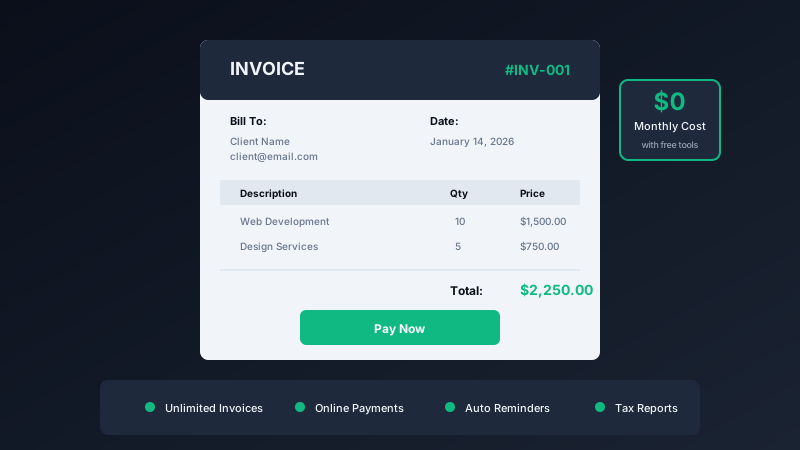
Essential features for invoicing:
- Professional templates that look legitimate
- Automatic numbering and date tracking
- Online payment options for faster collection
- Automated reminders for overdue invoices
- Tax calculation and reporting
The Best Free Options
Wave
Completely free accounting software with unlimited invoicing. Accept credit cards and bank payments directly through invoices. Best for businesses wanting a full accounting solution.
QuickInvoice from Pixel Pantry
QuickInvoice focuses on simplicity. Create professional invoices in seconds, no account required, no monthly fees. Perfect for freelancers who just need to send bills.
Zoho Invoice (Free Tier)
Free for businesses under specific revenue thresholds. Full-featured with time tracking, expense management, and client portals.
Getting Paid Faster
The tool matters less than the practices:
- Invoice immediately. Send invoices the moment work is complete.
- Offer online payment. Remove friction from the payment process.
- Set clear terms. Due dates should be prominent and reasonable.
- Follow up promptly. Send reminders before invoices become overdue.
Tax Time Made Easy
Good invoicing software tracks everything you need for taxes:
- Total revenue by period
- Sales tax collected
- Outstanding receivables
- Payment history
When April comes, you are prepared instead of panicked.
The Bottom Line
Do not pay for invoicing software until you have outgrown free options. For most small businesses and freelancers, free tools provide everything needed to look professional and get paid on time.
Your clients will not know (or care) whether you used a $50/month tool or a free one. They just want a clear invoice they can pay easily.