The average small business spends over $200 per month on software subscriptions. Much of that spending is unnecessary. For nearly every paid SaaS product, there is a free, open source alternative that is just as capable.
This guide shows you how to replace expensive subscriptions with powerful open source tools.
Why Open Source?
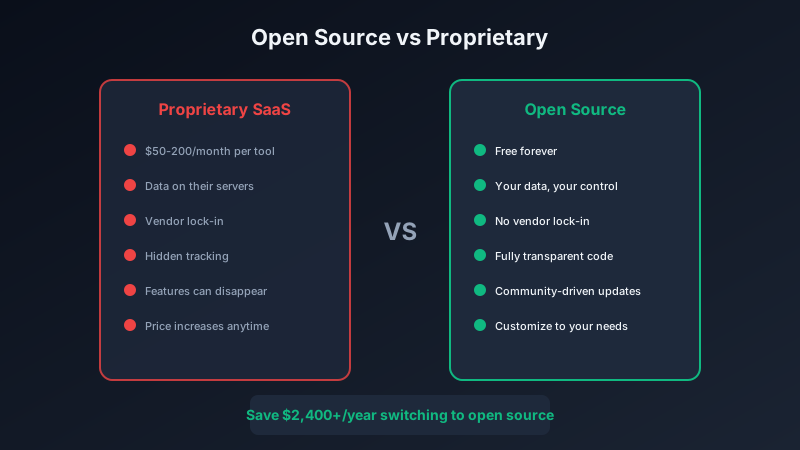
Open source software provides several advantages beyond cost savings:
- No vendor lock-in: Your data stays in standard formats you can always access
- Full transparency: You can see exactly what the code does
- Community-driven: Features are built based on user needs, not profit motives
- Customizable: Modify the software to fit your exact requirements
The Replacements
Office Suite: LibreOffice (replaces Microsoft 365)
Savings: $100-150/year per user
LibreOffice handles documents, spreadsheets, and presentations with full Microsoft Office compatibility. For most users, it does everything they need.
Project Management: OpenProject (replaces Asana/Monday)
Savings: $120-300/year per user
OpenProject provides Gantt charts, Kanban boards, time tracking, and team collaboration. Self-hosted versions are completely free.
Design: GIMP and Inkscape (replaces Adobe Creative Suite)
Savings: $600+/year
GIMP handles photo editing while Inkscape covers vector graphics. Combined with Blender for 3D work, you have a complete creative suite at no cost.
Video Editing: DaVinci Resolve (replaces Premiere Pro)
Savings: $240/year
DaVinci Resolve's free version is used by professional filmmakers. It includes color correction, audio editing, and visual effects that rival any paid software.
Password Management: Bitwarden (replaces 1Password/LastPass)
Savings: $36-60/year
Bitwarden is fully open source with a generous free tier. The paid version costs just $10/year for premium features most users do not need.
Note-Taking: Joplin (replaces Evernote)
Savings: $130/year
Joplin offers markdown notes, end-to-end encryption, and sync across devices. It is everything Evernote does without the subscription.
Total Potential Savings
Making the Switch
Transitioning to open source does not have to be painful:
- Start with one application. Pick the tool with the highest subscription cost or the one you use least.
- Run parallel. Use both tools for a month to ensure the open source option meets your needs.
- Export your data. Most SaaS products let you export data in standard formats.
- Cancel the subscription. Once you are comfortable, stop paying.
When to Stick with Paid Software
Open source is not always the answer. Consider staying with paid options when:
- Your team already knows the paid tool and switching costs are high
- The paid version integrates with critical systems that open source does not support
- You need guaranteed support and SLAs
- Time savings from paid features justify the cost
The Pixel Pantry Approach
At Pixel Pantry, we build free software because we believe useful tools should be accessible to everyone. Our applications complement open source alternatives - simple, focused tools that do one thing really well.
Whether you are using LibreOffice or Microsoft 365, our FocusFlow helps you stay productive. Whether your notes are in Joplin or Notion, our tools work alongside them.
The point is not to avoid all paid software - it is to pay only for what genuinely adds value. Open source alternatives give you the freedom to make that choice.